Aminova University
Learn Aminova, one page at a time
Step-by-step guides with real screenshots for every page, every feature and every role. Read them here, or download any guide as a PDF.
No guide matches that yet. Try another word.
Setup guides
What to set up before you open, one step at a time.
Take card payments
Connect your card processor, add your card terminals, then set your payment rules: deposits, no-show fees, cash prices and your own payment types.
Read the guideSet up your clinic profile and hours
Add your clinic’s name, contact details, address and IDs, set your time zone and opening hours, add your locations, and upload your logo.
Read the guideSet up your consent forms
Bring in the consent PDFs you use today, place the signature boxes, and decide who signs each one and how often. Then attach them to your visit types.
Read the guideSet up e-prescribing
Get each prescriber able to send prescriptions electronically: what Setup checks, the details each prescriber needs, and the extra steps for controlled substances.
Read the guideConnect your calendar
Each provider connects their own work calendar. Their visits show up on it without patient names, and their busy times stop Aminova offering those slots.
Read the guideBring your patients over from your old system
Move your patients, charts, documents and forms into Aminova. Upload the files, check what was found, approve it, then look around before you make it final.
Read the guideBring in your intake forms
Upload the PDFs you use today and check each one, or start from our template. Then publish them and attach them to your visit types.
Read the guideSet up your inventory
Put your shelves into Aminova once: your categories, your suppliers, every item and how many you have. From then on, the counts keep themselves.
Read the guideInvite your team
Give everyone at your clinic their own login, with the right role. Then add providers’ credentials so patients can be booked with them.
Read the guideSet up labs
Add your lab accounts and order codes, choose how results get in, and decide which panels patients can ask for.
Read the guideSet up memberships and packages
Build each plan you sell once: its price, what it includes, and its terms. Then it is ready to give to any patient from their chart.
Read the guideSet up your patient app
Choose your clinic code, what patients can do in the app, who they can message, and what they are told. Then give patients their sign-in details.
Read the guideSet up your rooms
Add each room and each piece of equipment that gets booked, in the order they sit on your floor. Then tell each visit type which rooms it can use.
Read the guideSet up staff shifts
Put everyone’s working hours on the roster. For providers, those shifts are the hours patients can book.
Read the guideTurn on two-step sign-in
Make everyone confirm their sign-in with a code from an app on their phone. Set up your own first, then your team is walked through it the next time they sign in.
Read the guideSet up video visits
Choose where your video visits happen, make the right visit types video visits, and try one on your practice patient.
Read the guideSet up your visit types and booking link
Build each kind of visit once: its length, providers, rooms, price and forms. Then turn on the link patients book from.
Read the guidePage manuals
Every page in Aminova: what is on it, and how to use it.
Analytics
How the clinic is doing: money, patients, visits and what’s selling. Pick a time frame, compare it with the one before, and take the numbers with you.
Read the guideAppointments
Every visit, for everyone. Book visits, run the front desk, and open any appointment to check a patient in, move it or charge it.
Read the guideAI Assistant
Ask how to do anything in Aminova, by typing or out loud. It knows the software, not your patients.
Read the guideHIPAA Audit Trail
Who opened, changed or exported what, and when. Check flagged events, export the log, and keep your privacy records in one place.
Read the guideBilling
Bill patients, take payments and keep track of what’s owed. Make invoices, record and refund payments, print receipts, and set up your discounts.
Read the guideCare Plan
A visit, one step at a time: pick the patient, choose a protocol, build and sign the plan, record vitals, write prescriptions, and finish.
Read the guideClinical Notes
Every note for every patient, in one place. Write a note, sign it, find it again later, and change a signed note the right way.
Read the guideCo-signatures
Everything waiting on your signature as a reviewer, oldest first. Read it, co-sign it or decline it, and choose whether you get an email when something new arrives.
Read the guideCommunications
Send one message to a group of patients, build courses patients work through in their portal, and set how your emails look.
Read the guideConsents
Your consent forms, and who has signed them. Send forms, hand the tablet over in the office, and keep your library of forms in order.
Read the guideDashboard
Your clinic at a glance. Today’s numbers, who is coming in, the money taken, work that needs a person, and the bell where anything new for you lands.
Read the guideDispensary
Your clinic’s own supplements, and how many are on the shelf. Hand one to a patient, take the payment, and add supplements to the shelf.
Read the guideDocuments
Every file your clinic keeps, sorted into folders. Upload, find, send for signature, and send and receive faxes.
Read the guideE-Prescriptions
Write, sign and send prescriptions, and see where each one really is. Pharmacy messages, the state drug check and medication history live here too.
Read the guideIntake Engine
Build the forms patients fill in, choose where their answers go, and review what they send you.
Read the guideInventory
What is on your shelves, what is running low, and what is on order. Count stock, record lots, reorder from your suppliers and receive deliveries.
Read the guideLabs
Order tests, bring results in, and review them before patients see them. Every lab in the clinic, on one page.
Read the guideMessages
One inbox for every conversation with your patients and your team. Reply, hand a message to the right person, and leave notes only your team can see.
Read the guideMy Schedule
Your own day, one visit at a time. Open a visit to see who it is, start it, read the brief, record it with the AI scribe and write your note.
Read the guideThe patient chart
Everything about one patient on one page. The header says who they are and what’s next; the tabs below hold each part of their record.
Read the guidePatients
Every patient in your clinic. Find anyone, sort and filter the list, add a new patient, put patients in groups, and open a chart.
Read the guidePharmacy
Track every pharmacy order from Pending Rx to Delivered, fax a signed prescription, and keep the list of pharmacies your clinic uses.
Read the guideProducts
Everything you sell, and what you charge for it. Add compounds, services, supplies and supplements, set their cost and price, and see every patient order.
Read the guideProtocols
Your treatment programs. Build one step by step, price it, publish it, and see who is on each one and how they are doing.
Read the guideRefills
Approve or decline refills, get them signed and sent, and see what really reached the pharmacy. Approving is not sending.
Read the guideRooms
Who is in which room right now, the day room by room, and where you set your rooms up.
Read the guideSettings
How your clinic runs: your details and hours, payments, what patients are told, the patient app, security, connected tools and who can do what.
Read the guideStaff Scheduling
Who works when, and who is away. Set shifts, see who is on right now, ask for time off, and approve it.
Read the guideSuggestions
Tell the Aminova team what would make Aminova better for your clinic. It goes straight to us.
Read the guideTeam
Everyone who works at your clinic. Invite people, give each a role, keep their credentials up to date, and remove someone who has left.
Read the guideTime Clock
Clock in and out, and take breaks. Hours and overtime add up on their own, and owners and managers fix mistakes and export hours for payroll.
Read the guideTreatment Plans
Every patient’s plan: the medicines, the doses and the weeks they run. Build a plan in phases, approve it, and see it the way the patient does.
Read the guideWorkflows
Messages and tasks that happen on their own. Pick what starts one, who it is for and what it does, check who it reaches, then switch it on.
Read the guideFeature manuals
The big features, end to end, across every page they touch.
AI scribe
The AI scribe listens to a visit and drafts the note. It records only patients who agreed to it, and a person checks and signs every note.
Read the guideE-prescribing and refills
One prescription from start to finish: written, signed, sent electronically or by fax, then refilled when the patient asks. Approving a refill is not sending it.
Read the guideForms and consents, start to finish
A visit is booked, its paperwork goes out, the patient fills it in at home or on a tablet, and the answers come back to you. Here is every step, and what your team signs.
Read the guideInventory and dispensing
How your stock counts keep themselves. Deliveries add to them; doses given, prescriptions dispensed and orders handed over take away. Every move is recorded.
Read the guideLab orders and results
One lab, start to finish: the order, the draw, the result coming back, your review, and the moment the patient gets to see it.
Read the guideMemberships and packages
Plans patients pay for: a membership that bills on repeat, or a package paid once that counts down. Build it once, give it to a patient, and their benefits track themselves.
Read the guideMessaging and reminders
How your clinic reaches patients: messages, booking confirmations, appointment reminders and other notices. What goes out on its own, how you control it, and what patients can turn off.
Read the guideThe patient app
Your patients’ side of Aminova, screen by screen: how they get in, what each tab does, and where each thing they do shows up for your team.
Read the guidePayments and checkout
Money from start to finish: the deposit when a visit is booked, the charge at the visit, the receipt, a refund if one is needed, and where it all shows up.
Read the guideRoom steps
For visits that move through more than one room: vitals, then treatment, then recovery. Set the steps once, then move the patient on with one tap.
Read the guideVideo visits
A video visit from booking to note: the patient joins from their app, you join from My Schedule with their chart beside the video, and the note and summary follow.
Read the guideThe tutorial and the checklist
A guided walk through every page you use, and a checklist of what to learn and set up. Practice on a made-up patient that nothing ever reaches.
Read the guideRole manuals
Everything one role needs to know, in one place.
For billing staff
Your day in billing: the money taken, invoices and payments, refunds and receipts, memberships, discounts, and the numbers in Analytics.
Read the guideFor the front desk
Your day at the front desk: the schedule, booking, checking patients in and out, taking payments, getting forms signed, and answering the phone.
Read the guideFor nurses and medical assistants
Your day as a nurse, NP, PA or medical assistant: the schedule, checking patients in, your own visits, charts, labs, the dispensary and your messages.
Read the guideFor owners and practice managers
Everything you need to set up the clinic, bring your team in, decide who can do what, and keep an eye on the money and the day.
Read the guideFor providers
Your day as a physician or prescribing provider: your schedule, the visit, your notes, prescriptions, refills and labs, all in the order you meet them.
Read the guideThe tutorial and checklist, inside Aminova
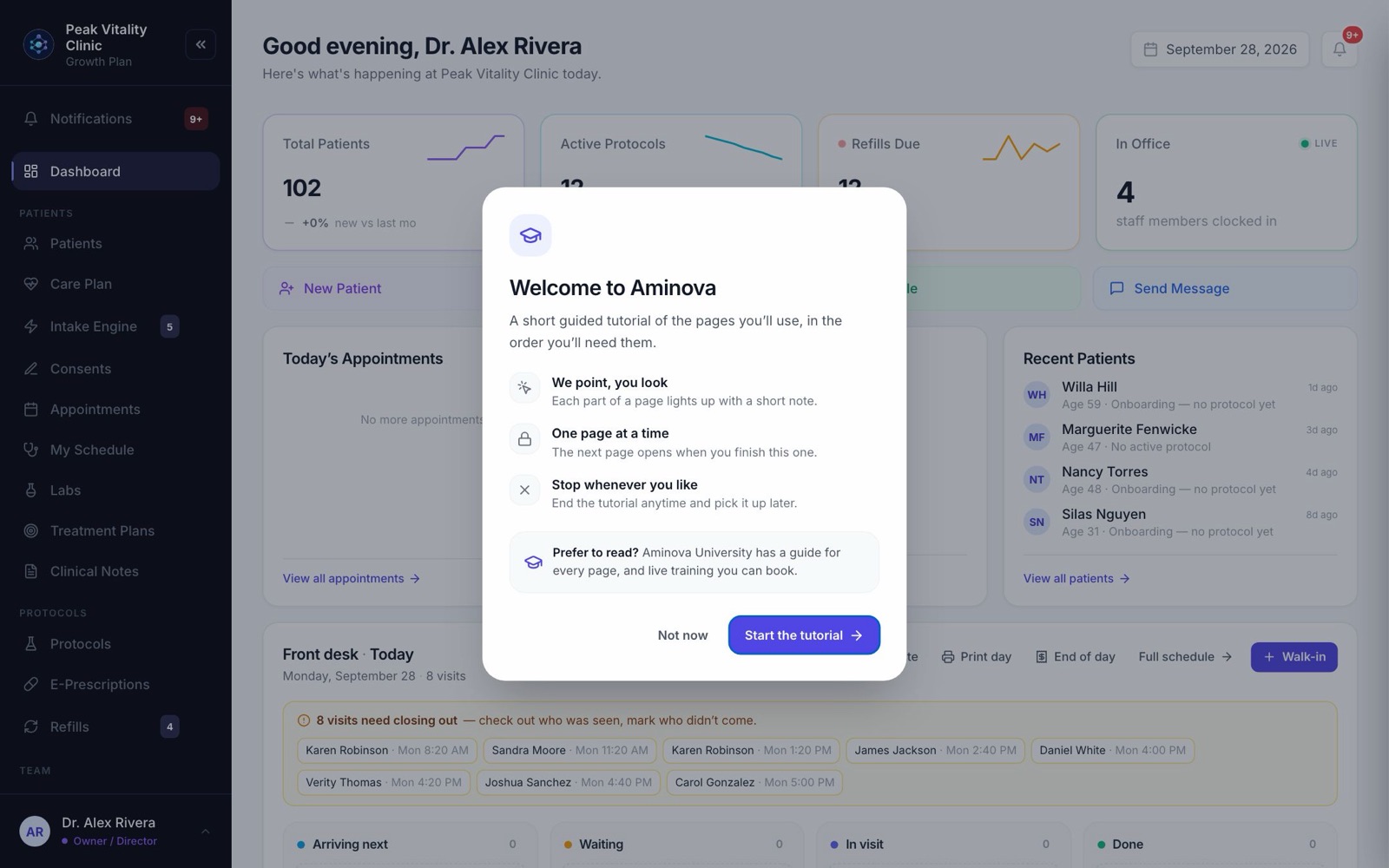
Part one of Aminova University lives in Aminova itself: a guided tutorial of every page you use, and a Getting started checklist that ticks itself off as you really do each task.
Sign in if you’re asked. The tutorial opens right after.
The tutorial
A walk through every page you use
It opens the first time you sign in on a computer, and any time after from your account menu, bottom left.
- One page at a time, in the order you’ll need them.
- Each part of a page lights up, with a short note beside it saying what it does.
- It shows only the pages your role uses.
- Stop any time, and pick it up where you left off.
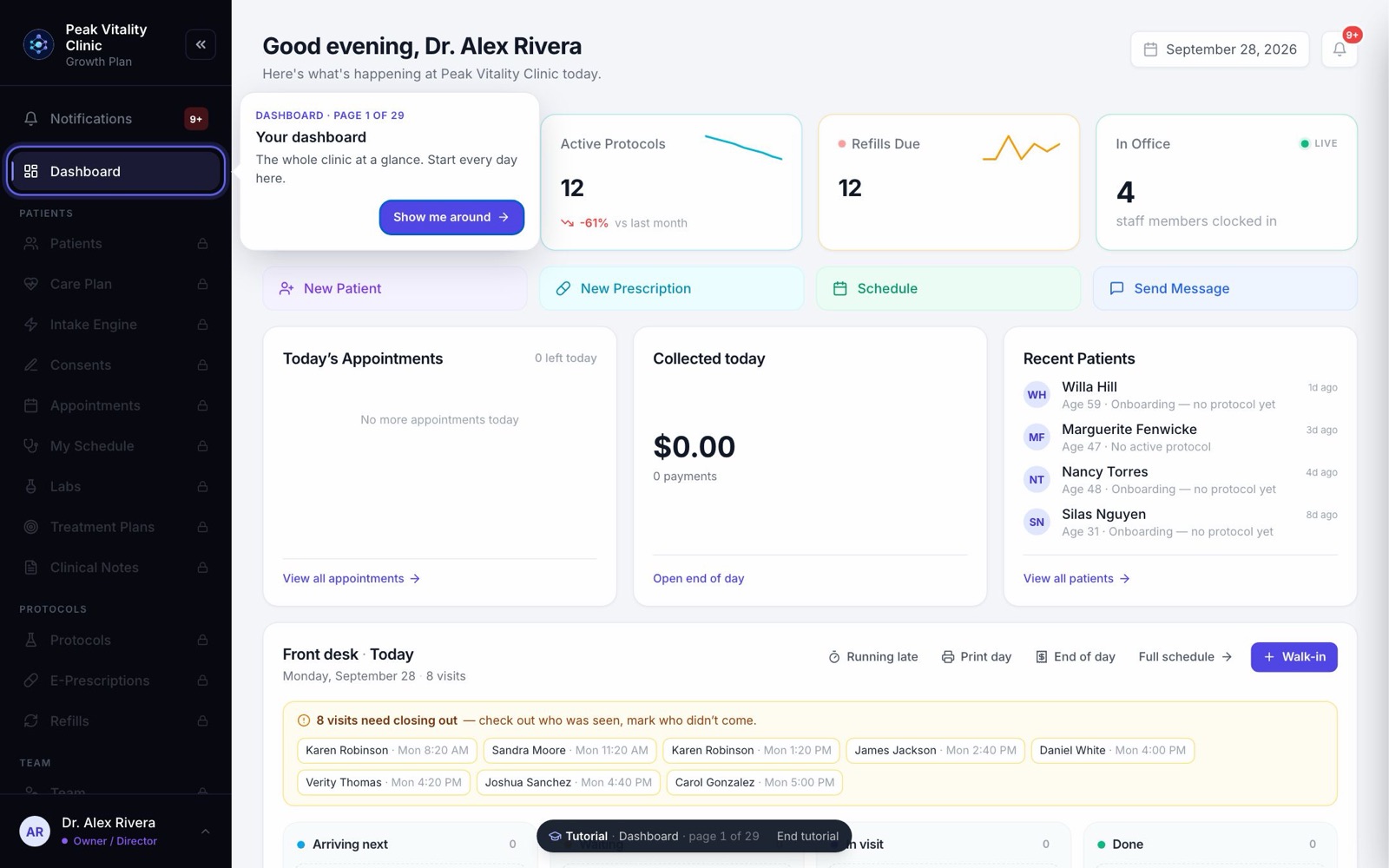
One page at a time
Each page opens when you finish the one before
The pages still ahead wait in the sidebar with a lock, so nothing is skipped by accident.
- Show me around starts the page.
- Next and Back move you along.
- End tutorial, at the bottom of the screen, stops it.
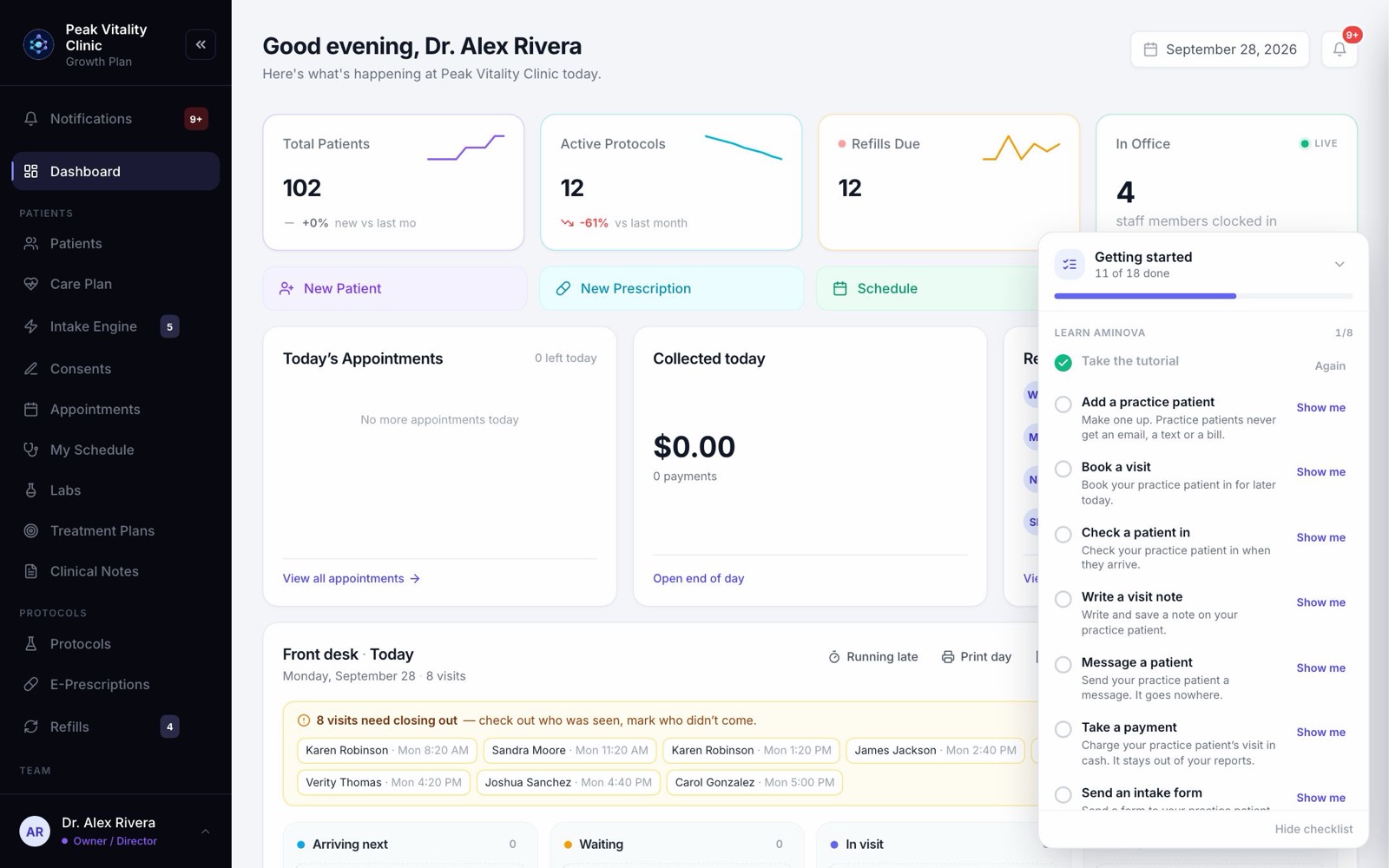
Getting started checklist
A short list that ticks itself off
In the bottom right corner. Each task is ticked once you’ve really done it, not when you say so.
- Show me walks you through each task, one click at a time.
- Practice on a practice patient. They never get an email, a text or a bill.
- Owners and managers also get the list of what to set up for the clinic.
Live training sessions
Three one-hour sessions with our team, over video. Take any of them, in any order. Book the one you need, and we’ll know what it’s for.
Getting set up
60 minutes, live with our team
Intake forms, consents, visit types, your booking link, and everything to do before you open.
Book this sessionPrescribing, billing and labs
60 minutes, live with our team
e-Prescribing and refills, taking payments and billing, analytics, and ordering and reviewing labs.
Book this sessionEverything else, and your questions
60 minutes, live with our team
Every other page and feature, walked through, with open time for your own questions.
Book this sessionVideos are coming
A short narrated video for every page, to watch in a corner of your screen while you try it. Until then, the guides here and the tutorial inside Aminova cover every page.