1What they are
A membership bills every month, quarter or year. It can include visits, services on a schedule, labs, a member discount and a treatment bank.
A package is bought once and counts down, like 10 IV drips.
Whatever a plan includes turns into credits on the patient’s chart when you give it to them. They are checked off as the patient uses them.
2Where they live
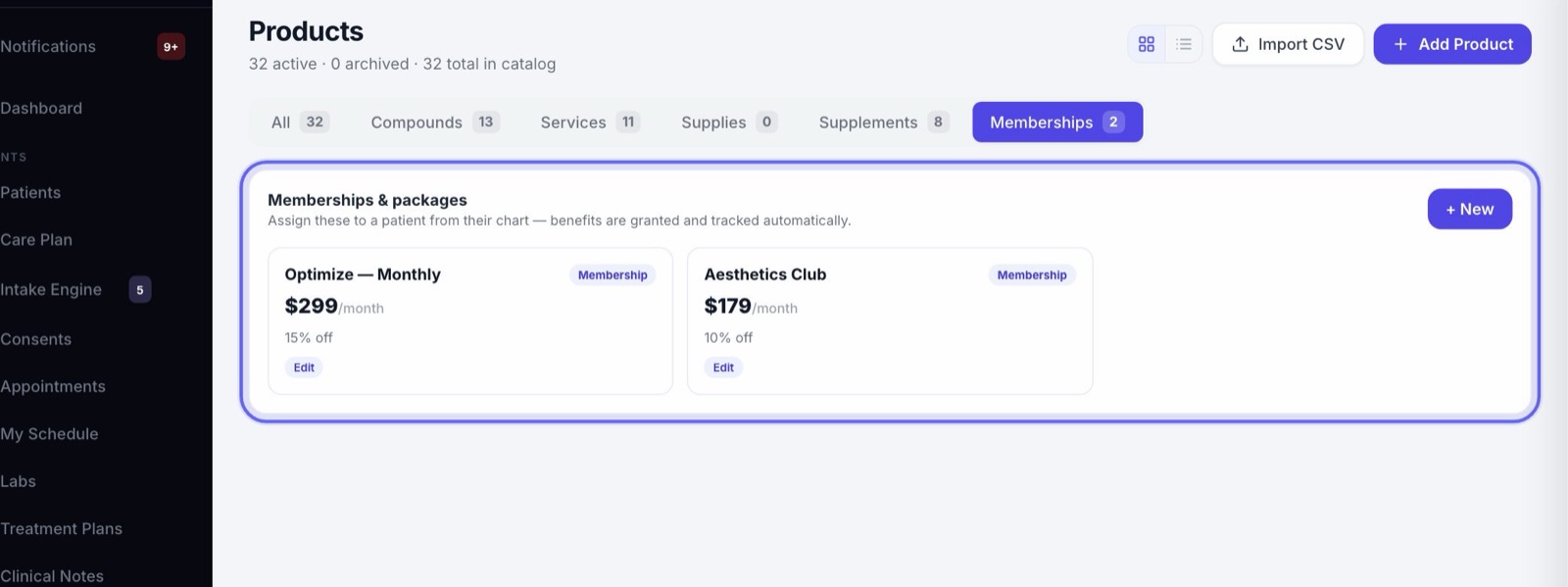
- 1Products → Memberships is where you build and edit your plans.
- 2The patient’s chart, under Credits & Membership, is where you give a plan to a patient and see what they have left.
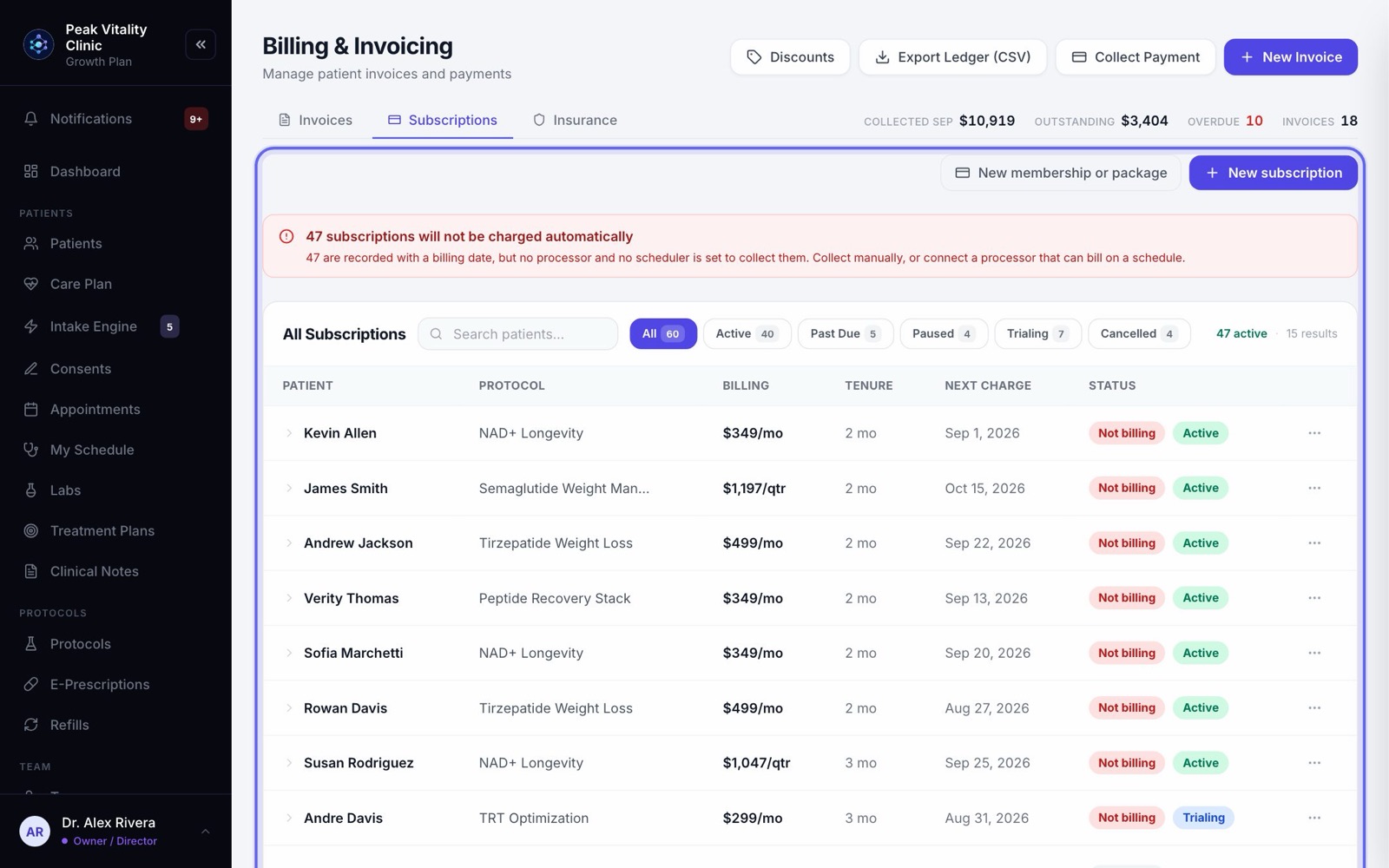
- 3Billing → Subscriptions lists every patient on a plan and their next charge.
3Build a plan
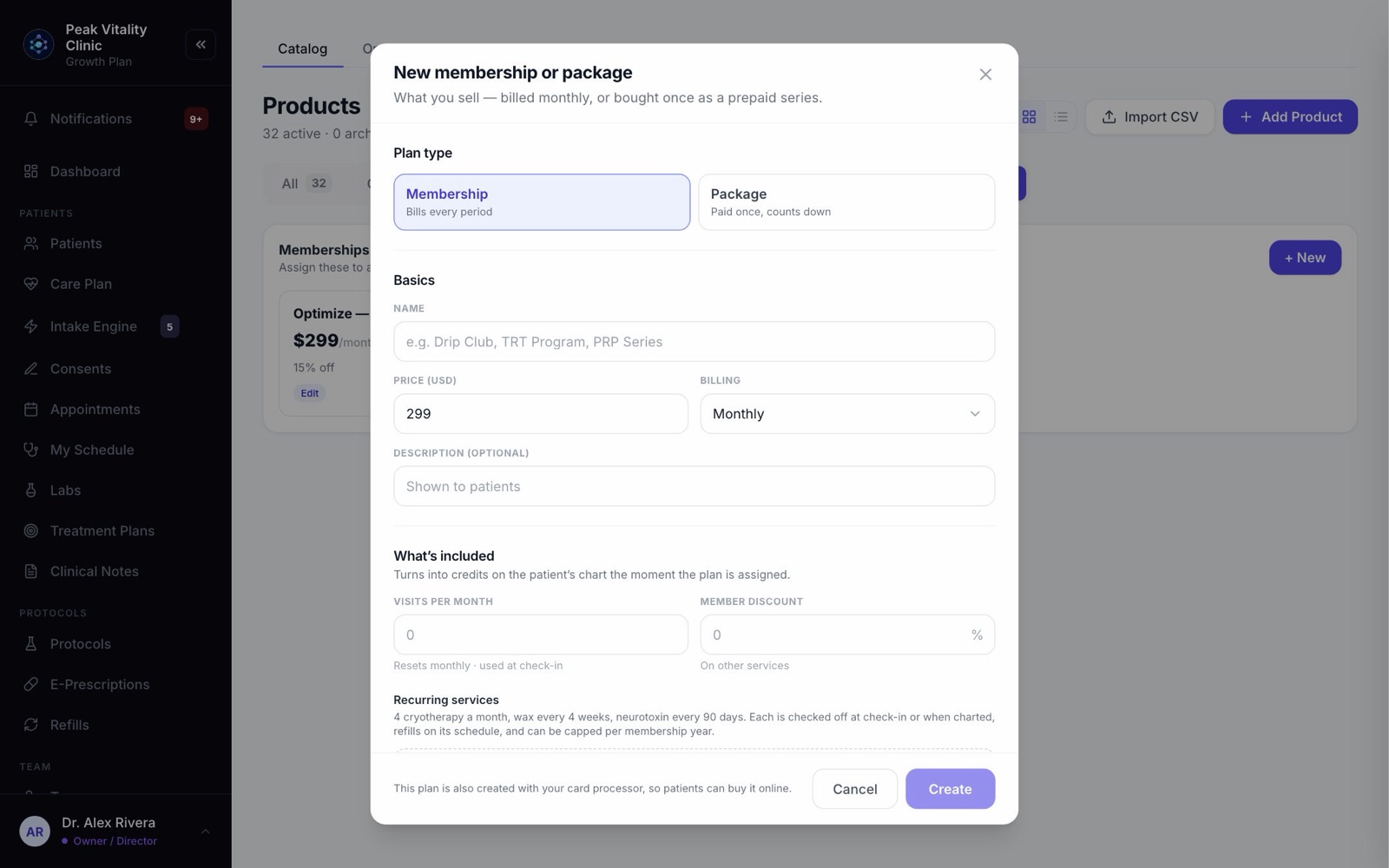
Press + New on the Memberships tab. Pick Membership or Package, then give it a name, a price and what it includes. Add terms and an agreement if members sign one.
The memberships setup guide walks through every part.
4Give a plan to a patient
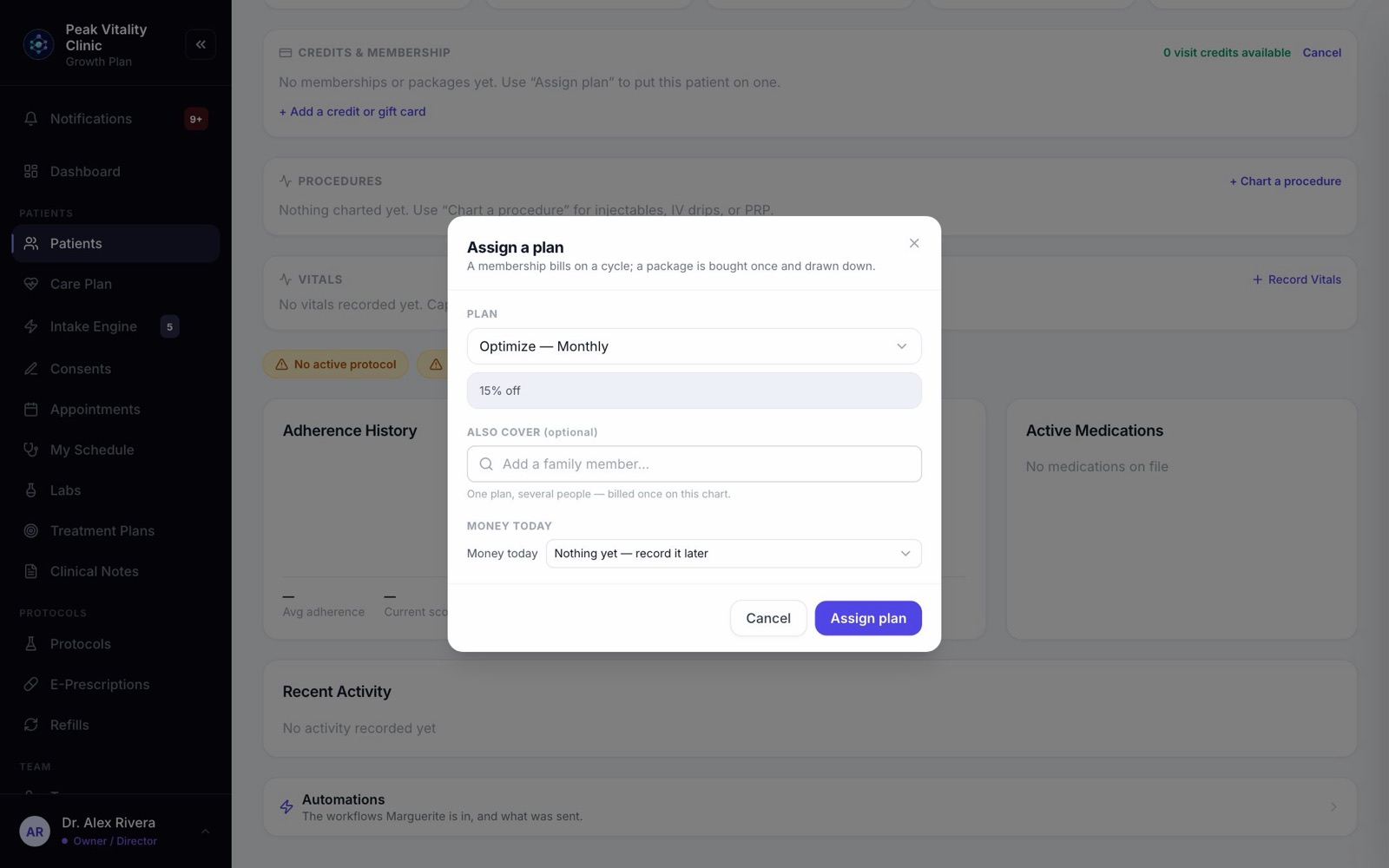
- 1Open the patient’s chart. On the Overview tab, find Credits & Membership and press + Assign plan.
- 2Pick the Plan. What it includes shows underneath.
- 3For a membership, Also cover adds family members. The plan is billed once, on this patient, and each person gets the benefits on their own chart.
- 4Under Money today, choose Charge the card on file, Collected at the desk — cash or check, Send to the terminal now, or Nothing yet — record it later.
- 5Press the button. It says what it will do: Assign plan, Assign & bill, or Send to terminal & assign.
Owners, managers, billing staff and anyone who can see revenue can assign plans. A practice patient is never billed.
5The agreement comes first
If the plan has an agreement, it is sent to the patient as soon as they join. No repeat charge runs until they sign it.
The membership card on the chart says where it stands: Agreement sent, not yet signed, or Agreement signed. If it couldn’t be sent, you are told to send it again.
6More than one plan
A patient can hold several plans at once, like a wax club and a neurotoxin club. They can’t hold the same plan twice.
Plans in the same tier group are levels of one program. Giving a patient another level offers to switch them: press Yes — switch their plan.
7The membership on the chart
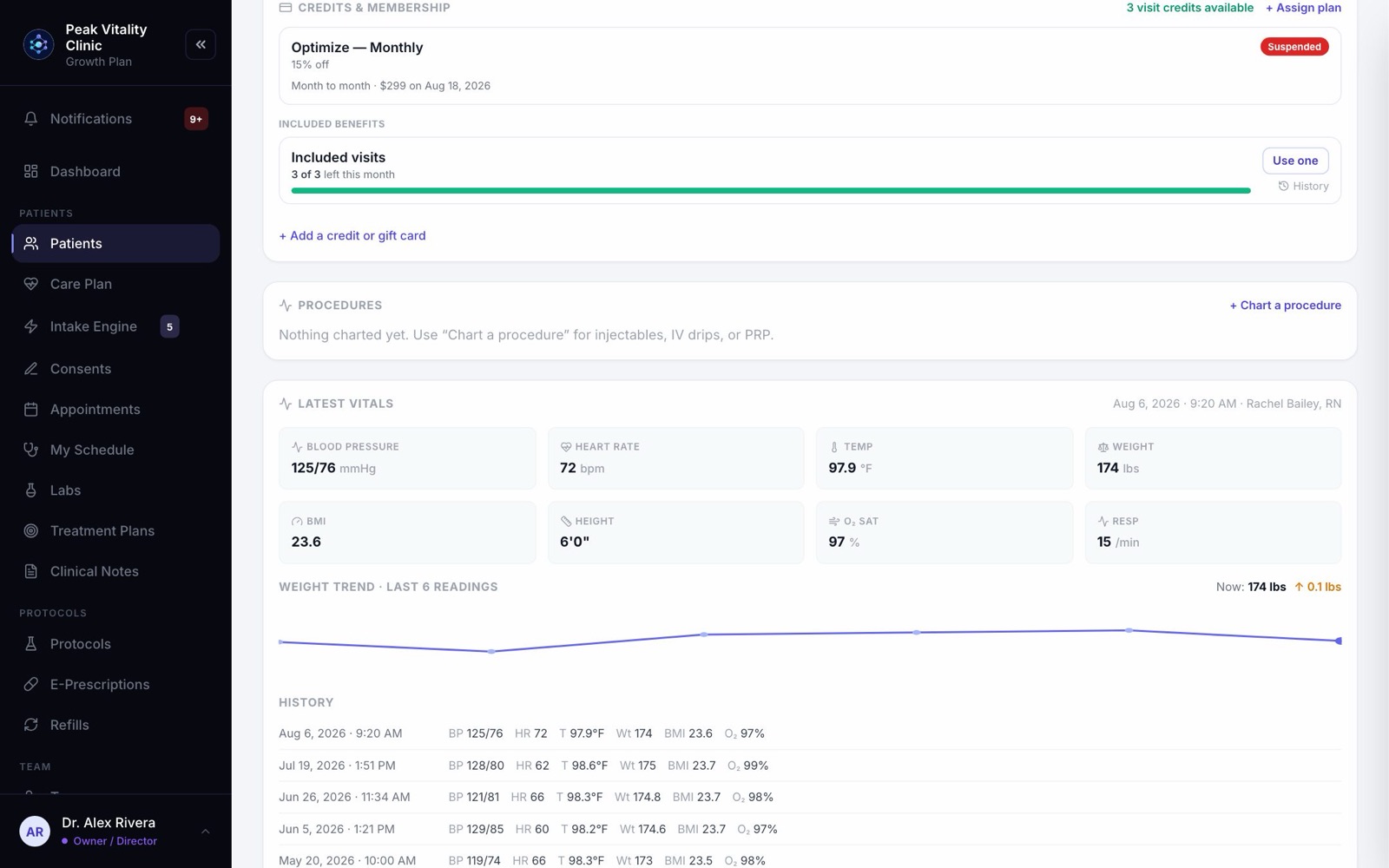
- 1Each plan the patient holds gets a card, with its state: Active, Past due, Paused, Trialing or Suspended.
- 2Under the name: the month of the commitment, the next charge and its date, and what was paid to join.
- 3If something due at the start never arrived, press Collect and choose how it is paid.
- 4If it says Nothing charges this membership until it has a billing date, press Start billing and pick one.
8Included visits
A membership’s visits are held when a covered visit is booked, and used when the patient checks in. If the check-in is undone, the visit comes back.
They refill each month. Credits & Membership shows how many visit credits are available.
9Services, labs and series
- 1A recurring service linked to a visit type or service is checked off by itself at check-in, or when it is charted.
- 2Units, like neurotoxin units, are used from the injection log.
- 3Under Included benefits on the chart, Use one checks one off by hand, with a date and a note. Each use is listed, and Undo takes it back.
- 4An included lab is used when a lab is ordered, and comes back if the order is canceled.
- 5A package’s series counts down one session at a time.
10Member discount and treatment bank
A plan’s Member discount is taken off at checkout on its own, for as long as the patient is on the plan.
A treatment bank gets money after each membership payment that goes through. The patient spends it on treatments at checkout. Prescriptions and compounds are never paid from it.
11Everyone on a plan
- 1Go to Billing and open the Subscriptions tab.
- 2Filter by Active, Past Due, Paused, Trialing or Cancelled.
- 3Tags on a row flag what needs you: Suspended, Agreement unsigned, No billing date, Due in person, and Unused for a member who used nothing this period.
- 4Click a row to see more. The … menu holds Edit Amount / Cycle, Pause Subscription and Cancel Subscription.
12When a payment is declined
A declined payment makes the membership Past due. The chart shows the day its benefits pause, which is the plan’s grace days after the decline.
After that, it reads Suspended, and its benefits are paused. A payment that goes through makes it active again.
13Medication plans
A plan whose price includes a medication is never charged to a card on file. When a period is due, the membership reads Due in person.
Press Collect this period on the chart, or Collect on the Subscriptions list. Take it on the terminal, or as cash or a check.
14Cancel a membership
- 1On Billing → Subscriptions, open the row’s … menu and pick Cancel Subscription.
- 2If the patient is still inside their commitment, the box works out what the agreement says they owe: what they used at your regular prices, what they paid, and their deposit.
- 3Nothing is charged there. Collect it, invoice it or waive it, as you decide.
- 4Type the Reason for cancellation and press Cancel. Future billing stops. Keep Subscription closes the box without canceling.
15What the patient sees
In their app, patients see each membership they hold and what it includes. They see how many of each benefit they have left, and when the next one is ready.
Depending on how your card payments are set up, patients may also join a plan from their app. The note in the plan builder tells you whether they can.
Keep going
Set up memberships and packages
Build each plan you sell once: its price, what it includes, and its terms. Then it is ready to give to any patient from their chart.
Read the guideBilling
Bill patients, take payments and keep track of what’s owed. Make invoices, record and refund payments, print receipts, and set up your discounts.
Read the guideThe patient chart
Everything about one patient on one page. The header says who they are and what’s next; the tabs below hold each part of their record.
Read the guidePayments and checkout
Money from start to finish: the deposit when a visit is booked, the charge at the visit, the receipt, a refund if one is needed, and where it all shows up.
Read the guideThe patient app
Your patients’ side of Aminova, screen by screen: how they get in, what each tab does, and where each thing they do shows up for your team.
Read the guideRather be shown?
Inside Aminova, the tutorial walks you through every page, and the Getting started checklist shows you each task click by click. Or book a live training session with our team.